Home How To Blogging Tips SEO

Pages

Showing posts with label How To. Show all posts

Jan 3, 2013

Surf Internet Without a Browser

+Anil Anvesh All these days we are browsing internet through browsers. There are many browsers available on the web.  Today we are sharing a simple tip using which you can surf internet without any browser.


Tip to Surf Internet Without any Browser:

1. Open Run, type calc and hit enter as shown in below pic. It opens windows calculator.
Windows Run


2. In calculator click on Help and then click on Help Topics as shown in below pic
Windows Calculator


3. In calculator help window right click on Title Bar and then click on Jump to URL as shown in below pic.
Windows Calculator help


4. A small popup window appears on the screen as shown in below pic, where you have to enter the url which you want to surf.
Windows calculator Browser


5. Finally after entering url hit enter. The requested website will appear in the side window of calculator help window as shown in below pic. 
Tech Knol


Note: If you want to browse another website follow the above steps 3 and 4. Type the full website address including http://

You May Also Like

Dec 18, 2012

How Cell Jammer Works?


Cell Jammers are originally developed by law of enforcement and military to interrupt calls by criminals and terrorists. Before discussing about how Jammer works let's know little about mobile network and mobile phones. Mobile communicates to its network using base station or cell tower. As mobile moves from place to place the signals are handed from one tower to another. Mobile phones are full duplex device which use different frequencies for sending and receiving.

-->

Cell Jammer

A Jammer Blocks or jams mobiles from receiving signals from base station. Jammers are of different sizes. Small hand held jammer blocks all bands within 9 meters range and larger jammer blocks mobile communication within 9kms/5miles. Small Jammer uses battery of mobile and large has to be charged. Jammer blocks not only calls but also internet, messaging and even emergency calls.

How Cell Jammer Works?

Jammers can work by either disrupting phone to tower frequencies or tower to phone frequencies. Jammer generally blocks signals coming from base station or cell tower because towers are placed far away and signals coming from that tower will have less frequency. Jammer sends radio waves along with same frequency that mobile uses causing enough interference with the communication between cell phones and towers making mobile unusable. Simply to say "Jammers block signal frequency by transmitting relatively high power signals (noise) on the same frequency. Because of this high power, a cell phone can’t identify the signal from tower and it keeps searching for signals".

Used - at places of worship, library to maintain silence, in Parliament to avoid disturbances and to prevent leakage of  information, in Army to block calls by criminals and terrorists and in schools and colleges to blocks calls of students.

You May Also Like
1. Bluejacking- Everything You Need to Know

-->

Dec 16, 2012

Bluejacking - Everything You Need to Know

-->


What is Bluejacking?

Bluejacking
Bluejacking, a hacking method by which an individual can send bulk messages to Bluetooth enabled devices with in certain radius(normally the range of Bluetooth is 10metres for mobile phones but for laptops it is 100metres with intense transmission) without pairing.

This doesn't involve any hijacking as in the name. Bluejacker can only send unsought messages. Hijacking doesn't actually occur here because the attacker will not govern the victim's device. At worst, Bluejacking is a vexation.


How Bluejacking can be done?

This is very simple and is explained below:
1). Select an area with plenty of mobile users.
2). Go to contacts in your address book. Create a new contact. 
3). Enter the message you want to send in the name part. Save the new contact.
Create New Contact


4). Choose send via bluetooth.
Send via Bluetooth

5). Then it searches for any Bluetooth enabled device with in the range.
Bluetooth devices detected


6). Choose one phone and send the contact.
7). You will get message like in below picture showing message is sent.
Message Delivery Report

Bluejacking can be prevented by setting a device in hidden, invisible or non-discoverable mode. However through this Bluejacking we don't have any harm to data in our phone. But there are certain techniques which will look quite similar to Bluejacking and can gain control over the data in our phones. Bluesnarfing and Bluebugging however are the actual attacks that may result in user loosing control on his device. These techniques will be explained in coming posts.


You May Also Like
1. Fuel cell - A Revolution in Technology 
-->

Format Removable Disk from Command Prompt

-->

Usually we format removable disks like pendrive and external HDD from windows interface by just right clicking on the disk and selecting format option as shown in below pic.
Foramt Removable Disk from WIndows
If your system is infected with virus sometimes it won't allow to format your removable disks by simply disabling right click on it. In such cases you can format your removable disks like pendrive and HDD from command prompt. Just follow below steps.

Step 1:

Open Run, Type cmd and hit enter.
Windows Run


 Step 2:
In command prompt type format Drive Name: as shown below
Windows Command Prompt


Step 3:
It verifies for the contents of the disk.


Format Removable disk from Command Prompt

After verifying it asks for the volume label as below.
Format Removable disk from Command Prompt

Step 4:
Type the name of the volume or drive you want to format and press enter.
Format Removable disk from Command Prompt

Step 5:

Now format has been completed.It shows the status as format complete with space available on disk.
Format Removable disk from Command Prompt

You May Also Like
1. Know the Manufacture Date of Your PC


-->

Dec 13, 2012

Know the Manufacture Date of Your PC

-->
Every PC has a manufacture date. You can check your PC's manufacture by 2 simple commands, Just follow below steps.

Step 1:
Go to start menu. Click on Run. A dialog box will appear, in that type cmd to open Command prompt.
Windows Run


Step 2:
In command prompt type Debug as shown in below pic and hit enter.
Command Prompt Debug


Step 3:
After hitting enter the pointer will blink in the next line as shown above then  type DF000:FFF5 as shown below pic and hit enter.
Command Prompt Debug


That's it the manufactured date of your PC appears as in the below pic. In my case it is 04/25/11.
Windows Command Prompt

You May Also Like
1. How to Restore Corrupted File Associations?

-->

Dec 6, 2012

How to Restore Corrupted File Associations?

What is File Association?

File association means a file with an application capable of opening  that file(usually determined by their filename.extension). For example we open images with Windows Picture Viewer, Video files with Windows Media Player or Vlc Player or with some other media player. Without these it is impossible to run/open any type of file because windows could not recognize the files. 


-->

File Association Problems

Sometimes these file associations will get corrupted due to virus attacks on the system. If all the file associations are attacked with virus then the best method is system restore. What if it is turn off and there is no previous point from which you can restore? There is no option other than to repair or format the PC. 
Windows File Open

Solution:

From the following websites you can get the fixes

XP file association fix 
http://www.dougknox.com/xp/file_assoc.htm 


Download these fixes from another system but not the infected one. After downloading these fixes copy these to the infected system.These fixes cant be run in the infested system directly.so,save them fore later usage.

Steps for running the fixes:

1) When file cant be opened windows will display error message like shown. In that click on Select the program from a list and click OK.

Windows File Open


2) Next click on Browse
Windows Choose Program


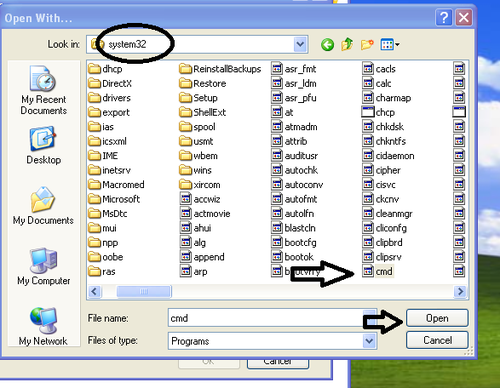
3) In this step goto C:/Windows/system32 and select cmd.exe 
Windows Open Withh


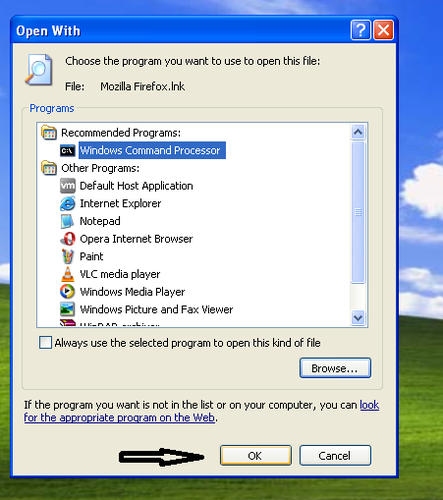
4) Select Windows Command Processor and then click OK
Windows Recommended Programs


5) Run following commands in Command Processor 
assoc.exe=exefile 
assoc.lnk=lnkfile 
assoc.reg=regfile 
After this restart your PC and check if you can open all the files, applications or not. If your system is infected with virus these commands wont work. At this time run the following command

regedit 


Press enter. You will get a registry window, as below. 


Go to file>>import 

Registry fixes can be imported as shown 

WIndows Registry Editor


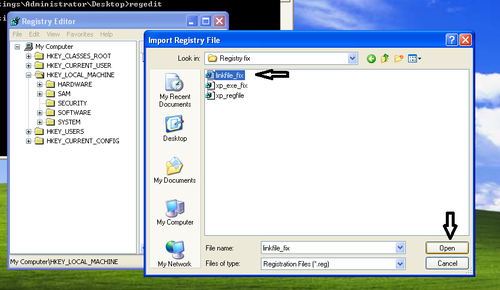
6) Select linkfile_fix and click Open. Finally restart your PC
Windows Import Registry File


You May Also Like
1. How DO I Know If My Email Has Been Read and When?


-->

Oct 23, 2012

How Do I Know If My Email Has Been Read and When?

SpyPig Logo

294 billion emails were sent each day across the world and 70% of emails were spam. Sometimes we send an email but we are not sure whether the recipient has read the mail or when the email has read and from where? Unfortunately there is no such tracking system available in Gmail/Yahoo/Hot Mail/Rediff. Fortunately there are some websites providing email tracking service. 
-->
# SpyPig SpyPig is a free email tracking tool that notifies you as soon as your recipient opens your email. Following are the steps to use SpyPig tool for mail tracking.

1. Create an account in SpyPig.
2. Sign in to your account.
3. Click on My SpyPig Factory in the next window enter the email to which you want to receive the notification, subject you want to receive, select a tracking image and finally click on Create My SpyPig as shown in below pic.
My SpyPig Factory
4. Copy and paste the tracking image in your mail before the timer elapses to zero. When the recipient opens your mail you will receive a confirmation mail as shown in below pic. You will receive the details such as date & time when the mail has been read, ip address and location.
SpyPig Email Notification

You can upload upto 10 images to SpyPig Gallery which you can use as a tracking image. For example you can use your business card or any greeting image.


You May Also Like

Oct 2, 2012

How to Create Bootable USB or DVD Drive?

Usually most of us install windows os using a bootable Windows DVD. What if our DVD drive is not working properly? We can also install windows operating system using a usb flash drive. For this we need Image file of Windows os which should be an ISO image. It's better to keep a backup of windows Image file. Either you can download bootable windows ISO image from microsoft if you purchased it from the microsoft or if you have a bootable windows dvd we can create a bootable ISO image from that disk.

How to create ISO image file from a bootable disk?

1. Download and install Magic ISO Maker trail version is enough for completing our task.
2. Launch the software. Click on Tools and Select Make ISO from CD/DVD-ROM as shown in below pic
Magic ISO Maker

3. In the next windows select Output File where you want to save the image file, Output format to Standard ISO image file and finally click on ok as shown in below pic. It takes sometime to create ISO image.
Make ISO from CDRom

How to create bootable USB drive from an ISO image?

  1. First download and install Windows7 USB/DVD TOOL from here. If prompted install .Net frame work.
  2. After installation Launch the tool.
  3. In the SOURCE FILE box, type the name and path of your Windows 7 ISO file, or click BROWSE and select the file from the OPEN dialog box. Click NEXT.

Windows 7 USB/DVD Download Tool
4. Select USB DEVICE to create a copy on a USB flash drive or select DVD disk to create a copy on a DVD disk.
Windows 7 USB/DVD Download Tool
5. If you are copying the file to a USB flash drive, select your USB device in the drop-down list and click BEGIN COPYING. If you are copying the file up to a DVD, click BEGIN BURNING.
Windows 7 USB/DVD Download Tool
6. That's your bootable USB or DVD drive is ready.
Windows 7 USB/DVD Download Tool

You May Also Like

Aug 22, 2012

How to Link Blogger Blog to a Custom Domain

Recently I bought a domain and hosting from Dreamhost. I linked my blogspot blog to the  new domain. In this post we will see how to link your blogspot blog to a domain.


Steps to link blogger blog to a Custom Domain

1. First you need to change the CNAME. Go to your domain or hosting site, login to your account. Click on the domain you purchased and then click on DNS. Next in the Name Server type ghs.google.com 

2. Next we need to change A records. Enter www in Name field. Since blogger blog is hosted by google you need to enter google IP addresses. Under A record there will be a field called Value enter following google IPs and create 4 different A records and then save.
216.239.32.21
216.239.34.21
216.239.36.21
216.239.38.21

Dreamhost DNS


3. Lastly go to blogger dashboard, click on settings, now you can see Blog address under publish. Enter the url to which your blogspot should be directed and then click on save. That's it now blogspot blog should be redirected to new domain. VHTVVMGVUJAS
Blogger Custom Domain


You May Also Like
1. Code for Random Posts


Aug 13, 2012

Turn Your Laptop or Desktop into a Wifi Hotspot

laptop as wifi routerThese days internet is everywhere. Many people has broadband connection and with wireless router you can share your data connection to many notebooks or desktops. But some of you can't afford to buy a wifi router. In such cases you can share internet connection on your laptop or pc to other Wifi capable devices by turning them as a wireless hotspots. 

For example you have wired broadband connection or 3G/4G data card which you can connect to a single pc or laptop. Now you can share this internet to other notebooks or desktops. There are many softwares available on the web for this.


1. Connectify Hotspot - Connectify Hotspot is an easy to use software router for windows that utilizes your PC's or  Notebook's built in Wi-Fi card to wirelessly share any internet connection to other wireless capable devices.

2. Virtual Wi-Fi Router - Similar software like connectify hotspot but it doesn't have as many features as connectify and only runs on Windows 7 or Windows 8.

3. Virtual Router - Similar to Virtual Wi-Fi router but it's completely free and provides security with WPA2 protection. Runs on Windows 7 or Windows 8

To see similar softwares like connectify me click here

You May Also Like
1. Extend The Range of Your WiiFi Signal

Aug 10, 2012

How to Make Your Blog or Website Multilingual?

Blogs and websites receive traffic from different parts of the world. Sometimes visitors don't understand the language of your blog or website. Especially news and regional blogs or websites will be in regional language which visitors can't understand. So it's better to include a language translator in your blog or website so that visitors can read the post in their own langauge. Google Translator supports over 60 languages. Let us see how to include a google translator in your blog or website.


For Blogger Blog

1. Go to blogger dashboard and then click on layout.
2. Based on your layout click on add gadget and then add translate gadget as shown in below pic.
3. Customize gadget according to your wish and then click on save. That's it from now google translator is part of your blogger blog. Try to change language and see how it works.
Blogger gadgets

For All Blogs and Websites

1. Go to Google Translator and click on Website Translator as shown in below pic.
google translator
2. Click on add website and then in next window enter your website or blog url and select your blog or website's original language as shown in below pic
google blog or website translator
3. In the next window customize your google translator and then click on get code as shown in below pic.
google website translator settings
4. You will get two codes in next window as shown in below pic. 
code for google translator
Code in 1st block you can copy it and paste in your blog or website template code before </head> tag. You may ignore 1st block code. Copy the 2nd block code and follow below steps.

For Blogger-  Go to blogger dashboard click on layout and an HTML/Javascript gadget as shown in below pic, paste the 2nd block code in it and then click on save.
blogger html/javascript gadget

For Websites- Paste the 2nd block code in your website template wherever you want. This is how your blog or website becomes multilingual. For example in my blog you can see google transalator as shown in below pic. Hope this helps!
google translator supported languages


You May Also Like
1. How to Remove Watermark from Images?